How VPNs Work: Tunnels, Encryption, and Servers Explained
Key points
- Your device encrypts all traffic and sends it to a VPN server, which forwards it onward.
- Websites see the server's IP address; your provider sees only one encrypted stream.
- DNS lookups must travel inside the tunnel, or your provider still sees every site name.
- Distance, server load, and protocol choice cause most slowdowns; a modern VPN protocol is the fast option.
On this page
When you tap the connect button in a VPN app, a lot happens in under a second. Your device and a remote server agree on secret keys, build an encrypted tunnel, and reroute your traffic through it. From that moment, your internet provider sees scrambled data instead of your browsing.
You do not need a networking degree to understand this. The core ideas are simple: a tunnel, some math that scrambles data, and a server that forwards traffic on your behalf. This article walks through each piece in plain language.
If you are brand new to the topic, start with our plain English introduction to VPNs, then come back here for the mechanics.
The Short Version
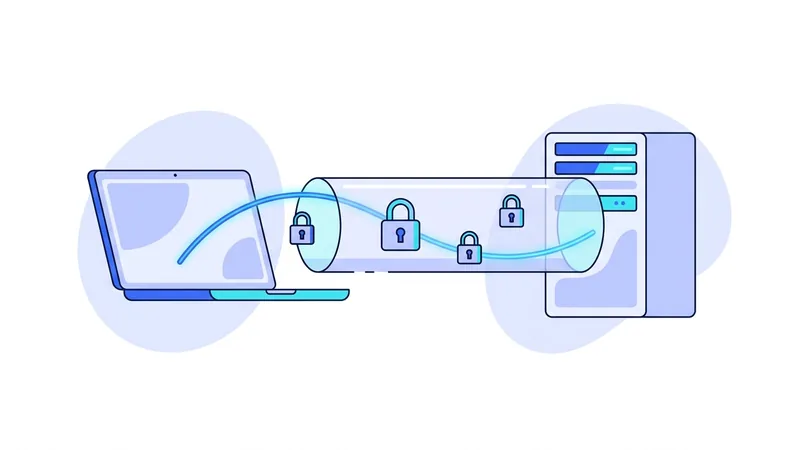
Here is the whole process in one paragraph. Your VPN app encrypts every piece of data leaving your device and sends it to a VPN server. The server decrypts it and passes it on to the website or app you asked for. The reply comes back to the server, gets encrypted again, and travels back to you. The website sees the server's IP address, not yours. Your internet provider sees an encrypted stream to one server, not the sites you visit.
Everything below is detail on how that paragraph actually happens.

Step by Step: What Happens When You Connect
- Your app contacts the server. The VPN app reaches out to the server you picked, for example one in Amsterdam or New York.
- You prove who you are. The app presents your credentials or device keys so the server knows your account is allowed to connect.
- The handshake. Your device and the server use public-key cryptography to agree on fresh session keys without ever sending those keys across the wire.
- The tunnel comes up. Your operating system updates its routing rules so that all traffic flows into the encrypted tunnel instead of going out directly.
- DNS switches over. Your device starts using the VPN's DNS resolver, so even your lookups of site names travel inside the tunnel.
- Traffic flows. From here on, every request is encrypted on your device, carried to the server, and forwarded to its destination.
If the connection drops, a good app repeats this process automatically and quickly. Fast reconnection is one of the reasons modern protocols feel so smooth.
Encryption in Plain English
Encryption turns readable data into noise that only the right key can unlock. Think of it as a lockbox. You and the VPN server each hold a matching key. You lock your data, send the box across the public internet, and only the server can open it. Anyone who grabs the box in transit gets nothing useful.
VPNs use symmetric ciphers for the heavy lifting because they are fast. The protocol vpn.now uses relies on a cipher called ChaCha20-Poly1305. Some older protocols use AES-256-GCM instead. Both have been studied by cryptographers for years and are trusted across the industry when configured properly.
Modern ciphers do one more job that gets less attention: they detect tampering. Every packet carries a short proof that it arrived exactly as it was sent. If anyone on the path flips even a single bit, the packet fails the check and gets thrown away. So the tunnel does not just keep your data private. It also keeps it intact.
Why the key exchange matters
The clever part is agreeing on keys safely. The handshake uses public-key math so both sides can compute the same secret without transmitting it. Good VPNs also rotate keys during a session. That property, called forward secrecy, means that even if one key were ever exposed, past traffic would stay protected.
VPN Protocols: The Rulebooks
A protocol is the rulebook that defines how the tunnel is built: how the handshake works, which ciphers are used, and how packets are wrapped. You will mostly meet these three:
| Protocol | Main strength | Trade-off |
|---|---|---|
| A modern protocol | Very fast, modern design, tiny codebase | Uses UDP only, so strict firewalls can block it |
| OpenVPN | Flexible, can run over TCP port 443 to pass firewalls | Older and larger codebase, usually slower |
| IKEv2/IPsec | Handles network switching well on phones | Less common in consumer apps, harder to audit end to end |
For a deeper look at the two big ones, read our guide on our protocol compared to OpenVPN. You can also see exactly which options we run on our protocols page.
What the VPN Server Does
The server is the other end of your tunnel. It decrypts your traffic, sends it to the destination, and relays the answers back to you. To the wider internet, your requests appear to come from the server's IP address. Because many customers share each server, your individual traffic blends into a crowd.
Server location matters for speed. Data cannot beat the speed of light, so a server 200 kilometers away will almost always feel faster than one across an ocean. Capacity matters too. A well run service monitors load and adds servers before they fill up. You can browse our server locations to see what is available near you, including each server's current status.
One detail surprises people: the server does not need to store anything about your browsing to do this work. Forwarding packets is a live, in-memory job, like a telephone switchboard connecting calls. What a provider chooses to record beyond that is a policy decision, which is why provider choice matters as much as the technology.
DNS: The Quiet Piece That Matters
DNS is the internet's phone book. Before your browser can load a website, it asks a DNS resolver to translate the site name into an IP address. Here is the catch: if those lookups travel outside the tunnel, your internet provider still sees every site name you request, even though your main traffic is encrypted.
A well built VPN sends DNS queries through the tunnel to its own resolver. If it does not, that is called a DNS leak, and it quietly undoes much of the privacy you wanted. Our guide to DNS leaks shows how to test for this in about a minute.
Tip: run a DNS leak test the first time you use any VPN, and again after major app updates. It takes a minute and confirms that your name lookups actually travel inside the tunnel.
Why a VPN Can Slow You Down
A VPN adds work: encryption on your device, an extra network hop, and decryption at the server. With a modern protocol and a nearby server, the loss is often small, sometimes just a few percent. But three things can make it worse. Distance adds delay on every round trip. A crowded server splits its capacity among everyone connected. And older protocols cost more processing time per packet.
The practical fixes are simple. Pick the closest city that meets your needs, prefer a modern protocol when available, and switch servers if one feels sluggish during peak hours. It also helps to test at different times of day before blaming the VPN, since home internet speeds rise and fall on their own schedule.
What Happens When the Connection Drops
Even a good VPN connection can blink out for a moment. Your Wi-Fi might hiccup, your laptop might wake up from sleep, or your phone might step out of Wi-Fi range and switch over to mobile data. In each case the secure tunnel that vpn.now builds has to be rebuilt, and there is a short window where things can go sideways if nothing is watching.
Here is the part that catches people off guard. The instant the tunnel drops, your device still wants to be online, so it can fall back to your normal unprotected connection for a few seconds while it sorts things out. During that gap, traffic that you expected to go through the tunnel could travel out in the open instead. It is brief, but it is real, and it happens without any warning on screen.
Two features are built to cover this gap:
- A kill switch blocks all internet traffic the moment the tunnel goes down, and keeps it blocked until the tunnel is back. Nothing slips out in the meantime.
- Auto-reconnect quietly rebuilds the tunnel in the background, so you usually do not have to do anything yourself.
Modern setups also handle network switching fairly smoothly. When your phone moves from Wi-Fi to mobile data, the software can carry the session across so your apps barely notice. The takeaway is simple. A good VPN plans for drops instead of pretending they never happen, and turning on the kill switch is the one small habit that closes the gap for you.
Summary
The key points about how VPNs work:
- A VPN encrypts traffic on your device and routes it through a remote server.
- The handshake uses public-key cryptography to agree on session keys safely, with forward secrecy protecting past sessions.
- Modern VPN protocols are the rulebooks that define the tunnel.
- Websites see the server's IP address. Your provider sees only an encrypted stream.
- DNS lookups must travel inside the tunnel, or your provider still sees site names.
- Distance, server load, and protocol choice decide most of the speed you feel.