What Is a VPN? A Plain English Guide
Key points
- A VPN encrypts your traffic and replaces your IP address with the server's address.
- It helps most on public Wi-Fi and keeps browsing domains away from your internet provider.
- It does not block viruses, stop phishing, or make you anonymous; logins and cookies still identify you.
- Free VPNs often pay their bills with your data; test any service for a week before buying long plans.

On this page
You have probably seen ads that claim a VPN will fix every problem you have online. The truth is calmer and more useful. A VPN is one tool. It does a few jobs very well, and it does not do other jobs at all. Knowing the difference helps you decide whether you need one.
VPN stands for virtual private network. When you turn it on, your device builds an encrypted connection to a server run by a VPN service. Your internet traffic travels through that protected connection first, and then goes out to the websites and apps you use.
This guide explains what that means in everyday language. You will learn what a VPN protects, what it cannot protect, the main types of VPN services, and how to decide if one is worth paying for.
What a VPN Actually Does
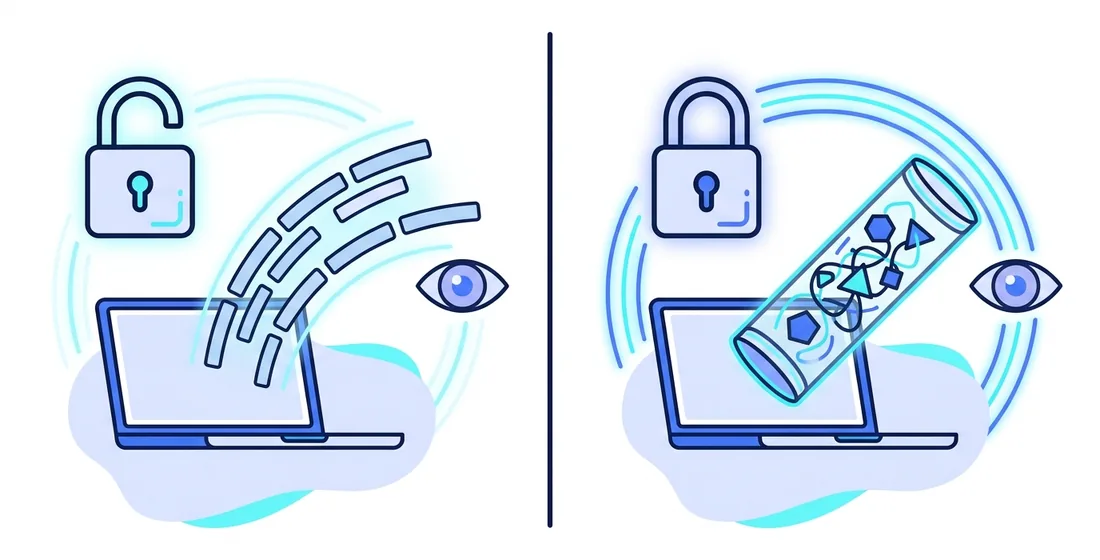
A VPN does two main things. First, it encrypts the traffic between your device and the VPN server. Encryption scrambles your data so that anyone who intercepts it sees only random noise. Your internet provider, your mobile carrier, or the owner of a coffee shop network can see that you are connected to a VPN, but they cannot read what travels inside that connection.
Second, a VPN changes the IP address that websites see. An IP address is the number that identifies your connection on the internet. Without a VPN, every site you visit can see the address your internet provider assigned to you. That address points to your rough location and your household connection. With a VPN, sites see the address of the VPN server instead.
That is the whole core of it. Everything else a VPN offers builds on those two features. If you want the technical details behind the curtain, read our guide on how VPNs work under the hood.
Why People Use a VPN
People turn on a VPN for many different reasons. These are the most common ones we see:
- Safer public Wi-Fi. Hotel, airport, and cafe networks are easy places for strangers to watch traffic. A VPN encrypts your connection before it touches the network. We cover this in detail in our article on using a VPN on public Wi-Fi.
- Less tracking by IP address. Websites and ad networks use your IP address as one signal to build a profile of you. A VPN replaces it with a shared server address used by many people at once.
- Privacy from your internet provider. Without a VPN, your provider can see every domain you visit. With one, it sees only an encrypted stream going to a single server.
- Working while traveling. A VPN gives you a stable, encrypted path to the internet from networks you do not control, like hotel rooms and conference halls.
- Reducing some forms of throttling. If a provider slows down specific kinds of traffic, encryption can make that targeting harder. This is not guaranteed, and results vary by network.
What a VPN Does Not Do
This part matters just as much. A VPN is not an invisibility cloak. If you log in to a website, that site knows who you are, VPN or not. Your account is your identity. Cookies and browser fingerprinting also keep working while a VPN is on, so advertisers can often recognize your browser anyway.
A VPN does not block viruses, and it does not stop phishing emails. It cannot protect you if you type your password into a fake login page. It also does not make you anonymous to every party on the internet. The VPN provider itself sits in the middle of your connection, so picking a provider you trust matters a great deal.
Plenty of marketing in this industry overpromises. We wrote a separate piece on common VPN myths that sorts real benefits from sales talk, and our breakdown of what a VPN hides and what it does not goes deeper on the privacy side.
The Main Types of VPN Services
Not every VPN serves the same purpose. The table below compares the three kinds you will run into most often.
| Type | Who runs it | Main goal | Best for |
|---|---|---|---|
| Personal VPN | A commercial VPN service | Encrypt traffic and replace your IP address | Everyday privacy and public Wi-Fi safety |
| Business VPN | Your employer's IT team | Reach internal company systems securely | Remote work on company networks |
| Self-hosted VPN | You, on a rented server | Full control over the server | Technical users who want to manage everything |
This guide focuses on personal VPNs, since that is what most people mean when they say "a VPN". A business VPN protects company resources, not your personal browsing. A self-hosted VPN gives you control, but it ties all activity to a server rented in your own name, which can reduce privacy rather than improve it.
Do You Need a VPN?
A VPN is a good fit if you
- Use laptops or phones on networks you do not control, like cafes, hotels, or airports.
- Want to keep your browsing domains away from your internet provider.
- Want websites to see a shared server address instead of your home IP address.
- Travel often and want one consistent, encrypted path to the internet.
You may not need one if you
- Only browse at home and are comfortable with what your provider can see.
- Expect a VPN to stop viruses or scams. Other tools handle those jobs.
- Want complete anonymity. A VPN alone cannot deliver that, and no honest service will claim it can.
Tip: before you commit to any VPN for a year or more, test it for a week on the networks you actually use. Check the speed at home, at work, and on your phone. A plan only makes sense if it works well in your real daily life.
What a VPN Costs
Most reputable VPN services charge between 3 and 13 dollars per month, with longer plans priced lower per month. Be careful with free VPNs. Running servers costs real money, so a free service has to pay its bills some other way. That often means ads, data sharing, or weak and crowded infrastructure.
When you compare prices, look at three things: the total cost over the full term, the renewal price after the first term ends, and the number of devices you can connect at once. You can see how we handle this on our plans and pricing page, including the exact amount each plan renews at.
How to Start Using a VPN
Getting started takes about five minutes. You create an account, download the app for your phone or computer, sign in, and press connect. The app picks a nearby server for you by default, which is usually the right choice for speed. Most people never need to touch another setting.
A few small habits make the experience better from day one. Install the app on every device you carry out of the house, not just your laptop. Turn on the option that connects automatically on Wi-Fi networks you have not used before. And leave the VPN running in the background. Modern protocols use very little battery and you will mostly forget it is there.
Give yourself a week of normal use before judging the service. Browse, stream, take video calls, and work the way you always do. If everything feels normal, the VPN is doing its job quietly, which is exactly what it should do.
What Using a VPN Feels Like Day to Day
Once vpn.now is set up, the daily experience is simpler than most people expect. You open the app and press one button. It usually connects in a second or two, and then it runs quietly in the background while you browse, stream, or work as normal. A small icon in your menu bar or on your phone screen shows that it is on. After the first day or so, you will rarely think about it at all.
For most people, that is the whole story. You are not constantly turning things on and off or changing settings. You press connect in the morning, and it stays out of your way. The goal is for protection to feel boring, which is a good thing. It should fit around your normal habits instead of asking you to change them.
It is fair to mention the small bits of friction too, because being honest helps you know what is normal:
- Some websites may occasionally ask you to solve a captcha, since you share an address with other people using the same server. It takes a few seconds and then you move on.
- A few apps, like certain banking apps, may want the VPN turned off to work. You can switch it off for a moment and back on after.
- On a slower connection, you may notice a little less speed, since your traffic takes a slightly longer path.
None of these are daily problems for most users. They come up now and then, and they are easy to handle. For most people, a VPN is set-and-forget, not a constant chore. You turn it on, get on with your day, and let it do its job.
Summary
Here is what to remember about VPNs:
- A VPN encrypts traffic between your device and a VPN server, and it replaces your IP address with the server's address.
- It protects you most on networks you do not control, like public Wi-Fi.
- It does not make you anonymous, block malware, or stop phishing.
- Logged-in accounts, cookies, and browser fingerprinting still identify you.
- Free VPNs usually pay their bills with your data. Paid services should publish honest renewal pricing.
- Test any VPN on your real networks before you buy a long plan.