How to Run a VPN on Your Router
Key points
- A router VPN puts every home device in one tunnel, including smart TVs and consoles.
- The router counts as one connection, so device limits stop mattering at home.
- The router's processor limits speed; prefer a modern VPN protocol and pick strong hardware.
- It only protects you at home, so keep VPN apps on phones and laptops that travel.
On this page
Normally you install a VPN app on each device. There is another way: run the VPN on your router. The router builds one encrypted tunnel to a VPN server, and every device that uses your Wi-Fi or its cables travels through that tunnel automatically.
It is a genuinely useful setup with real trade-offs. You gain whole-home coverage, including devices that cannot run apps at all. You give up per-device control and some speed, and the setup takes more patience than tapping connect.
This guide explains how router VPNs work, what hardware you need, how the setup goes, and who should bother. It assumes you know the basics of what a VPN does.
How a Router VPN Works
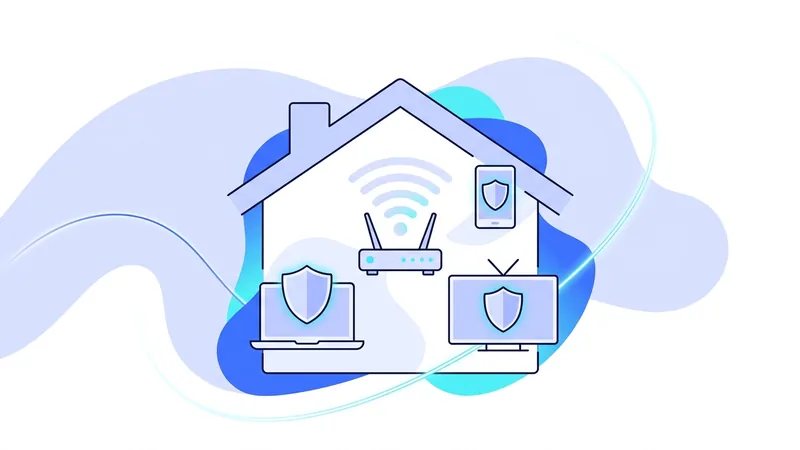
When a VPN runs on your router, the router itself is the VPN client. It holds the keys, performs the handshake with the VPN server, and encrypts traffic as it leaves your home. Devices on your network do not need to know anything about it. They connect to Wi-Fi as usual, and their traffic gets wrapped in the tunnel on the way out.
From the internet's point of view, your whole household appears at the VPN server's address. From each device's point of view, nothing changed at all. That transparency is the main appeal, and also the main caution: devices are in the tunnel whether or not it suits them.
Why People Do It
- Covering devices that cannot run VPN apps. Smart TVs, game consoles, streaming sticks, printers, and smart home gear mostly have no VPN option of their own. The router is the only practical way to put them in a tunnel.
- No device limits. A VPN subscription allows some number of simultaneous connections. A router counts as one connection no matter how many devices sit behind it.
- Always-on protection at home. Nobody has to remember to connect. Every device is covered from the moment it joins the network.
- Guests included. Visitors on your Wi-Fi get the same coverage without installing anything.
The Honest Downsides
Speed is the big one. Encryption takes processing power, and router processors are small. A budget router running OpenVPN may deliver only a modest fraction of your line speed. A modern protocol is far lighter and current routers handle it much better, but the router is still usually the bottleneck. The general rules in our guide to VPN speed apply double on router hardware.
Control is the other. With one tunnel for the whole house, switching server locations affects everyone at once, and there is no per-app choice. Some devices also behave oddly behind a VPN, and on a router you cannot just toggle the app off for one gadget. Capable firmware solves this with policy-based routing, which works like split tunneling at the network level, sending chosen devices outside the tunnel.
Finally, the router only protects you at home. Your phone on cafe Wi-Fi is on its own, so keep apps on the devices that travel.
There is also a maintenance duty that the app experience hides from you. A VPN app updates itself. A router tunnel does not. You become the person who applies firmware updates, rotates configurations when your provider changes servers, and notices when the tunnel silently stops working. None of this is hard, but it is yours now, and an unmaintained router tunnel can fail without anyone in the house realizing it.
What Hardware You Need
The router your internet provider supplied almost certainly cannot do this. You need a router that supports VPN client mode, and you have three broad paths:
| Option | Effort | Notes |
|---|---|---|
| Router with built-in VPN client support | Low | Several consumer brands support a modern protocol or OpenVPN client mode in stock firmware. Check the spec sheet for "VPN client", not just "VPN server". |
| Community firmware (OpenWrt and similar) | Medium | Replaces the stock firmware on supported models. Powerful and flexible, including policy-based routing, but flashing firmware takes care. |
| Dedicated VPN router or small gateway box | Low to medium | A second router or mini device runs the tunnel and sits behind your main router. Lets you keep a VPN network and a normal network side by side. |
Whichever path you take, processor strength matters more than Wi-Fi marketing numbers. A router that lists hardware support for encryption, or simply a faster CPU, will carry the tunnel at much better speeds.
The Setup, In Outline
- Confirm support. Check that your router model supports a modern protocol or OpenVPN client mode, in stock or community firmware.
- Get a configuration from your VPN provider. Providers that support manual setup let you download a tunnel configuration or OpenVPN profile for a chosen server. Our manual setup guide walks through generating one.
- Load it into the router. In the router's admin pages, find the VPN client section, import the configuration, and enable it.
- Point DNS at the tunnel. Set the router to use the VPN's DNS servers, so name lookups travel inside the tunnel with everything else.
- Test. From a device on the network, check your public IP address and run a leak test. It should show the VPN server, not your provider.
- Decide what happens if the tunnel drops. Good firmware can block internet access when the VPN is down, the router version of a kill switch. Choose deliberately rather than discovering the default later.
Prefer a modern protocol for the tunnel if your router supports it. Our manual setup guide covers generating a config and importing it, and expect lower throughput on routers with small processors.
Tip: pick the VPN server closest to your home for the router tunnel, and resist changing it often. A router tunnel is infrastructure, not a toggle. Set it up once, verify it, and let it run.
Who Should Bother
A router VPN is worth it if you have a houseful of app-less devices you want covered, if you keep hitting your plan's device limit, or if you simply want home traffic handled once, centrally. It is overkill if you own two devices that both run apps happily, and it is the wrong starting point if you have never used a VPN before. Learn the apps first, then graduate to the router.
A middle path works well for many homes: run the tunnel on a second router and broadcast it as a separate Wi-Fi network. Devices that belong in the tunnel join that network. Everything else stays on the normal one. You get whole-home coverage where you want it, an easy escape hatch when something misbehaves, and no firmware surgery on your main router.
Check the practical details before you commit a weekend to this: that your provider supports manual configurations, and that your plan allows them. The vpn.now plans page lists what each tier includes, and router-friendly manual setup is part of the standard offering.
Double NAT and Selective Routing: Two Practical Realities of a VPN Router
When you add a second VPN router behind the box from your internet provider, you often end up with what is called double NAT. NAT, or network address translation, is the job of handing out local addresses to your devices and tracking their traffic. With two routers doing this job, your network has two layers of translation stacked on top of each other. Most everyday browsing will not notice, but double NAT can break some online games, cause trouble with video calls, and make port forwarding hard to set up.
The good news is that the fixes are simple. The cleanest option is to put your provider's box into bridge mode, sometimes called modem mode, so it stops acting as a router and lets your vpn.now router handle that job alone. If you cannot change that setting, you can connect your important devices to just one of the two routers, so their traffic only passes through a single layer of translation.
The second reality is selective routing. You usually do not want every device forced through the tunnel. A smart TV may need your real local region to play the right content. A work laptop might already run its own company connection. A game console often wants the lowest latency it can get, which means a direct path. Many router setups let you choose, device by device, which ones use the VPN and which connect straight to the internet.
A common split looks like this:
- Through the tunnel: phones, tablets, and home computers used for general browsing.
- Direct connection: smart TVs, work laptops with their own tools, and game consoles that need speed.
Plan both points before you build, and your router setup will be far less frustrating to live with.
Summary
Router VPNs in brief:
- The router becomes the VPN client, and every device on your network rides one tunnel automatically.
- It is the only practical way to cover smart TVs, consoles, and other devices without VPN apps.
- The router's processor limits speed. A modern protocol helps a lot, strong hardware helps more.
- You trade per-device control for whole-home coverage. Policy routing on good firmware restores some of it.
- Keep apps on phones and laptops, because the router only protects you at home.
- Set it up carefully once, test for leaks, and treat it as infrastructure.