UDP vs TCP for VPNs: Why the Transport Layer Matters
Key points
- TCP confirms and retransmits everything. UDP just sends, and VPN tunnels prefer UDP.
- Traffic inside the tunnel already manages its own reliability, so the tunnel does not need to.
- TCP tunnels risk meltdown on lossy networks, where stacked retransmissions turn small loss into stalls.
- Default to UDP, switch to OpenVPN over TCP port 443 only when a firewall blocks UDP, then switch back.
On this page
- Two Ways to Ship Data
- Why VPNs Prefer UDP
- TCP Meltdown: When Layers Fight
- So Why Does TCP Mode Exist?
- Side by Side
- A Practical Decision Rule
- How to Tell Which Transport You Are On
- Does This Matter for Gaming and Calls?
- QUIC and HTTP/3: the newer transport reshaping the web
- Summary
- Frequently asked questions
Somewhere in your VPN app's settings sits a small choice: UDP or TCP. Most people never touch it, and most of the time that is correct. But this one setting explains why your VPN flies on one network and crawls on another, and why it sometimes will not connect at all.
UDP and TCP are the two ways computers ship data across the internet. Every VPN tunnel rides on one of them, and they carry it in genuinely different ways. Ten minutes of understanding here pays off every time you hit a stubborn network.
If you want the full picture of what happens inside the tunnel itself, our explainer on how VPNs work covers encryption and handshakes. This article is about the layer underneath.
Two Ways to Ship Data
TCP: the careful courier
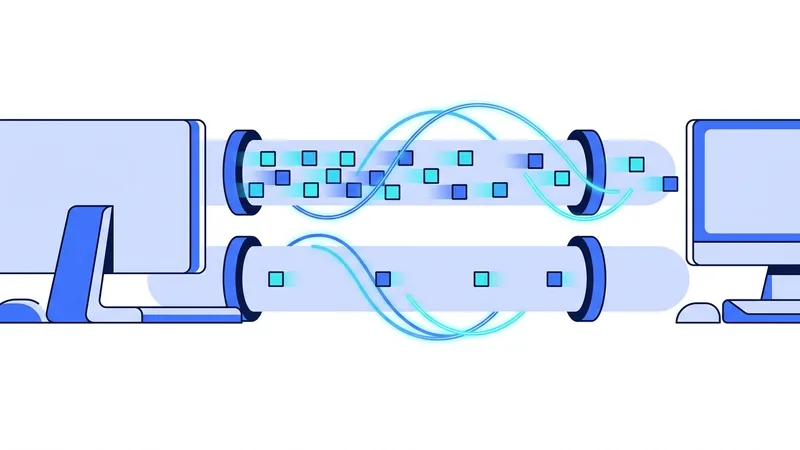
TCP treats delivery as a promise. Every packet is numbered, every delivery is confirmed, and anything lost gets sent again. Packets arrive in order or the receiver waits. This is exactly what you want for loading a web page or downloading a file, where a missing piece means corruption.
The care has a price. Confirmations flow back for everything, a lost packet stalls the line behind it, and the sender slows down whenever it senses trouble. TCP trades speed for certainty, on purpose.
UDP: the postcard
UDP just sends. No numbering, no confirmations, no retransmissions, no ordering. If a packet is lost, it is gone, and the next one arrives anyway. This sounds reckless until you realize how much of the internet wants exactly this: video calls, games, and live streams would rather skip a lost moment than pause and replay it late.
Why VPNs Prefer UDP
Here is the key insight: a VPN tunnel carries other traffic inside it, and that traffic already manages its own reliability. When you load a website through a VPN, the connection between your browser and the site is TCP, riding inside the tunnel. If the tunnel loses a packet, the browser's own TCP notices and resends. The tunnel does not need to fix anything, so a transport that does not try, UDP, is the right fit.
UDP also adds less overhead per packet and never imposes its own slowdowns, so the traffic inside the tunnel behaves almost as it would in the open. This is why modern protocols use UDP only, and why OpenVPN defaults to UDP. The protocols and ports we run are listed on our protocols page.
TCP Meltdown: When Layers Fight
Now run the tunnel over TCP instead and watch the layers collide. Your browser's TCP rides inside the tunnel's TCP. When a packet is lost on a shaky network, both layers notice, and both try to fix it. The tunnel resends, the browser resends, the duplicate fixes clog the line, the stalls multiply, and each layer slows down in response to congestion the other layer is causing.
Engineers call this TCP meltdown, and it is why a TCP tunnel on a lossy connection can feel dramatically worse than the raw loss numbers suggest. On a clean network you may barely notice TCP mode. On hotel Wi-Fi with 2 percent packet loss, it can turn a usable connection into a slideshow.
So Why Does TCP Mode Exist?
Because sometimes UDP is simply not allowed. Strict firewalls on hotel, office, campus, and some public networks block UDP traffic they do not recognize. On those networks, a UDP-only modern protocol cannot connect at all.
TCP on port 443 is the escape hatch. Port 443 carries HTTPS, the encrypted web, and blocking it would break nearly every website. OpenVPN over TCP 443 resembles that traffic closely enough that restrictive networks usually let it through. It is slower, and meltdown is a real risk on bad links, but it connects where nothing else will. The trade-offs between the two protocols are covered in our comparison of our protocol against OpenVPN.
Side by Side
| Factor | UDP tunnel | TCP tunnel |
|---|---|---|
| Speed | Faster, less overhead | Slower, confirmation traffic both ways |
| Lossy networks | Inner traffic handles its own fixes | Meltdown risk, stacked retransmissions |
| Real-time traffic (calls, games) | Good, late packets get skipped | Poor, stalls cause stutter |
| Strict firewalls | Often blocked | Usually passes on port 443 |
| Protocol support | Modern protocols and OpenVPN | OpenVPN only, among the common pair |
| When to choose it | Always, by default | Only when UDP cannot connect |
A Practical Decision Rule
- Start with the modern protocol, which means UDP. This works on the large majority of networks.
- If the VPN will not connect, try OpenVPN over UDP. Some networks block unfamiliar ports but allow UDP itself.
- Still stuck? Switch to OpenVPN over TCP port 443. If anything gets through, this will.
- Once you leave the strict network, switch back to UDP. Apps that fall back automatically often do not fall forward again.
That last step is the one people forget. A silent TCP fallback from one bad hotel can follow you home and explain weeks of mysterious slowness. It is one of the usual suspects in our checklist of reasons a VPN runs slow.
Tip: save two profiles in your VPN app, your everyday modern protocol setup and an OpenVPN TCP 443 fallback. When a stubborn network blocks the first, switching to the second takes ten seconds instead of a support ticket.
How to Tell Which Transport You Are On
Most apps make this easy once you know where to look. Open the settings or connection details screen and find the protocol entry. If it names a modern protocol, you are on UDP, always. If it says OpenVPN, look for a separate transport or port setting, which will read UDP or TCP, often with a port number beside it.
Watch out for the word "automatic". It is a sensible default, but it means the app decides per network, and it may have decided differently than you expect on the network you are using right now. If performance matters for a session, set the protocol explicitly instead of trusting the automatic choice. You can flip it back to automatic afterward, and the connection details screen will always tell you what the app actually picked.
Does This Matter for Gaming and Calls?
More than anywhere else. Games and video calls send their own UDP traffic because late data is worthless to them. Run that inside a TCP tunnel and the tunnel will dutifully stall to retransmit packets the game no longer wants, converting small losses into visible freezes. If you play over a VPN, UDP is not just faster, it is the only mode that respects how game traffic works. We cover the wider trade-offs in our guide to VPNs and gaming.
QUIC and HTTP/3: the newer transport reshaping the web
There is a newer way to move data online called QUIC, and it powers the latest version of the web, known as HTTP/3. A large share of popular websites already use it. The surprising part is how it is built. QUIC runs on top of UDP, the faster and looser of the two methods we talked about earlier. Yet it still gives you the reliable, in-order delivery that people used to count on TCP for. In short, it takes the speed habits of UDP and adds the dependability you expect when loading a page.
Why bring this up in a piece about VPN transport? Because it shows the whole internet is leaning the same direction your VPN already leans. The reasons QUIC chose UDP are the reasons a VPN often prefers UDP too: less waiting, faster recovery from hiccups, and smoother handling of shaky connections. When the biggest sites on the web make this move, it is a strong sign that UDP-based transport is the future, not a shortcut.
It also affects what you may run into on certain networks. Some places block or slow down UDP traffic. When that happens, it can interfere with two things at once:
- QUIC, so sites quietly fall back to the older, slower path
- UDP-based VPN traffic, which may stall or feel sluggish
There is an upside, though. Because QUIC traffic looks like ordinary modern web traffic flowing over common ports, UDP-based VPN traffic blends in more naturally than it once did. That makes it harder to single out at a glance. None of this removes the need to choose your transport wisely. It is just one more reason vpn.now leans on UDP when the network allows, and keeps a fallback ready for when it does not.
Summary
What to remember about VPN transport:
- TCP confirms and retransmits everything. UDP just sends. Both exist for good reasons.
- VPN tunnels prefer UDP because the traffic inside already manages its own reliability.
- TCP tunnels risk meltdown on lossy networks, where stacked retransmissions turn small loss into stalls.
- TCP port 443 remains essential for strict firewalls, because it resembles ordinary encrypted web traffic.
- Default to UDP, fall back to TCP only when blocked, and remember to switch back afterward.
If you want to feel the difference yourself, the vpn.now free plan lets you switch between both transports and test them on your own networks.